 WhatIs.site
Table of Contents
What Is Computer Architecture?
Computer architecture is the design and specification of a computer’s fundamental operational structure — it defines how a processor executes instructions, accesses memory, handles input and output, and coordinates all the components that turn electrical signals into useful computation. It sits at the boundary between hardware engineering and software, shaping everything from how your code runs to how much battery your laptop burns.
Why You Should Care About What’s Under the Hood
You might think computer architecture is only for chip designers at Intel or ARM. And sure, they’re the ones drawing transistor layouts. But here’s the thing — architecture affects you whether you realize it or not.
Every time your phone lasts all day on a single charge, that’s an architectural decision. Every time a video game renders 120 frames per second, architecture made that possible. When your program runs ten times faster after a simple optimization, you probably stumbled into (or against) an architectural feature like cache memory or pipeline behavior.
Software developers who understand architecture write meaningfully faster code. Not 5% faster — sometimes 10x or 100x faster. The difference between a cache-friendly algorithm and a cache-hostile one can be staggering. And as Moore’s Law slows down, squeezing performance from existing hardware matters more than ever.
The Von Neumann Architecture: Where It All Started
In 1945, mathematician John von Neumann described a computer architecture that stores both programs and data in the same memory. Before this, computers were essentially rewired for each new task — you physically reconfigured the machine. Von Neumann’s insight was simple but world-changing: treat the program as data.
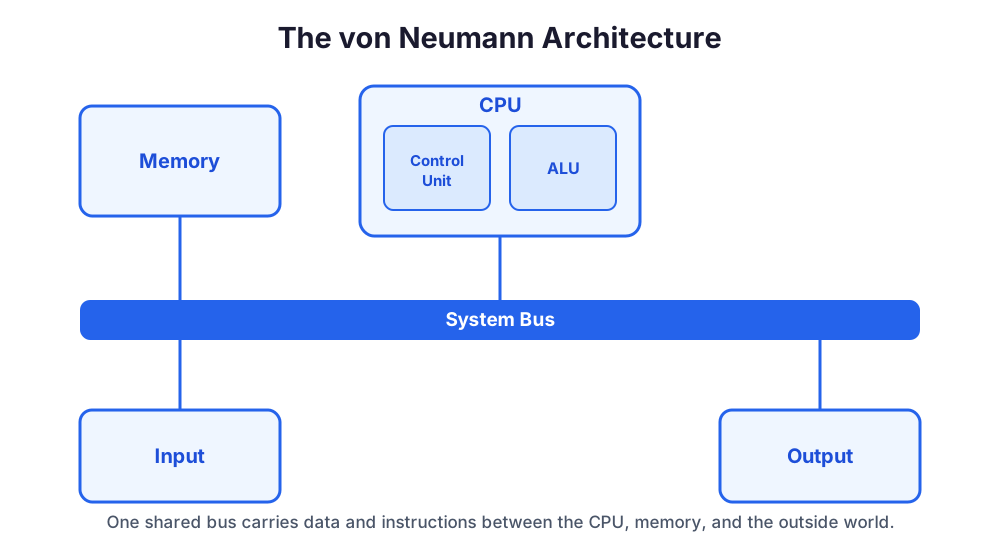
The Von Neumann architecture has four main components:
The Central Processing Unit (CPU) — the brain that executes instructions. It contains the Arithmetic Logic Unit (ALU) for math and logic operations, and the Control Unit (CU) that fetches instructions and directs the whole show.
Memory — a single store holding both instructions and data. The CPU reads instructions from memory, executes them, and writes results back to memory.
Input/Output (I/O) — the interfaces connecting the computer to the outside world. Keyboards, screens, network interfaces, storage devices.
The System Bus — the communication highway connecting CPU, memory, and I/O. Data, addresses, and control signals all travel along these pathways.
Here’s what’s remarkable: despite being conceived in 1945, this basic model still describes how most modern computers work. Your laptop, your phone, the servers running this website — they’re all essentially Von Neumann machines with decades of refinements layered on top.
The Von Neumann Bottleneck
There’s a fundamental problem with this design, and it’s been haunting engineers for 80 years. Because instructions and data share the same memory and the same bus, the CPU often sits idle waiting for data to arrive. The processor can crunch numbers far faster than memory can deliver them.
This is called the Von Neumann bottleneck, and an enormous amount of architectural innovation — caches, pipelines, out-of-order execution, prefetching — exists specifically to work around it. We’ll get to all of those.
The Harvard Architecture: A Different Approach
The Harvard architecture, named after the Harvard Mark I computer, separates instruction memory from data memory. Each has its own bus, so the CPU can fetch an instruction and read data simultaneously. No bottleneck — at least not from shared access.
Pure Harvard architectures are common in microcontrollers and digital signal processors (DSPs) where predictable, fast execution of specific tasks matters more than flexibility. Your car’s engine control unit probably uses one.
Most modern desktop processors use a modified Harvard architecture — they have separate instruction and data caches (Harvard-style) but a unified main memory (Von Neumann-style). Best of both worlds, mostly.
Inside the CPU: The Engine Room
The CPU is where computation actually happens. Let’s walk through what’s inside.
Registers: The Fastest Memory You’ve Got
Registers are tiny storage locations inside the CPU — usually 16 to 32 of them in a typical architecture. They hold the data the processor is actively working with. Accessing a register takes roughly one clock cycle. Accessing main memory? That can take 100-300 cycles.
This speed difference is not small. It’s the reason compilers work so hard to keep frequently used values in registers rather than constantly loading from and storing to memory.
Different architectures provide different numbers and types of registers. x86-64 has 16 general-purpose registers. ARM has 31. RISC-V varies by implementation. Some architectures include separate floating-point registers, vector registers, and special-purpose registers for things like the program counter and stack pointer.
The Arithmetic Logic Unit (ALU)
The ALU performs mathematical operations (addition, subtraction, multiplication, division) and logical operations (AND, OR, NOT, XOR, comparison). Modern processors have multiple ALUs so they can execute several operations simultaneously.
A typical ALU operation takes one clock cycle. Multiplication might take a few more. Division is the slowpoke — it can take 20-40 cycles even on modern hardware. This is why compilers will convert division by constants into multiplication by reciprocals whenever possible.
The Control Unit
The control unit orchestrates everything. It fetches the next instruction from memory, decodes it to figure out what operation to perform, then signals the appropriate parts of the CPU to execute it. In a simple processor, this happens step by step. In a modern processor, the control unit manages an incredibly complex pipeline that executes dozens of instructions simultaneously in various stages of completion.
Instruction Set Architecture: The Contract Between Hardware and Software
The Instruction Set Architecture (ISA) is arguably the most important concept in computer architecture. It defines the set of instructions a processor can execute — the interface between hardware and software. Think of it as a contract: software says “add these two numbers,” and the ISA guarantees the hardware will do exactly that, regardless of how the silicon underneath is organized.
CISC: The Kitchen Sink Approach
Complex Instruction Set Computing (CISC) architectures provide a large number of instructions, including specialized ones for complex tasks. The x86 architecture — found in most desktop PCs and servers — is the most famous CISC design. It has over 1,500 instructions.
The philosophy: make each instruction do as much work as possible. A single x86 instruction can load a value from memory, add it to a register, and store the result — all in one instruction. This made assembly programming easier and reduced program size (important when memory was expensive).
The downside? Complex instructions are harder to execute quickly. They take variable numbers of clock cycles, making pipeline design difficult.
RISC: Less Is More
Reduced Instruction Set Computing (RISC) takes the opposite approach. Use a small set of simple, uniform instructions that each execute in one clock cycle. Need a complex operation? Combine multiple simple instructions.
ARM is the most commercially successful RISC architecture, powering virtually every smartphone on Earth plus Apple’s M-series laptops. RISC-V is the exciting newcomer — an open-source ISA that anyone can implement without licensing fees.
RISC processors are generally simpler to design, easier to pipeline, and more power-efficient. The tradeoff is that programs may need more instructions to accomplish the same task. But modern compilers are excellent at generating efficient RISC code, so this rarely matters in practice.
The RISC vs. CISC Debate Is Basically Over
Here’s the funny part: modern x86 processors (CISC on the outside) actually decode complex instructions into simple micro-operations internally and execute them on a RISC-like core. And modern ARM processors (RISC) have added increasingly complex instructions for specific tasks like cryptography and machine learning.
The architectures have converged. The debate that consumed the 1990s is now mostly academic. What matters is the specific implementation, not the philosophical camp.
Pipelining: The Assembly Line of Computing
Pipelining is one of the most important architectural techniques ever invented. The idea is borrowed directly from manufacturing assembly lines.
Without pipelining, a processor executes one instruction completely before starting the next. With a five-stage pipeline, the processor breaks instruction execution into five stages — fetch, decode, execute, memory access, write-back — and works on five different instructions simultaneously, each at a different stage.
Imagine washing, drying, and folding laundry. Without pipelining, you’d wash a load, dry it, fold it, then start the next load. With pipelining, you start drying load one while washing load two, and start folding load one while drying load two and washing load three. Same machines, three times the throughput.
Pipeline Hazards: When Things Go Wrong
Pipelining isn’t free. Three types of hazards can stall the pipeline:
Data hazards occur when an instruction needs the result of a previous instruction that hasn’t finished yet. If instruction 2 needs the output of instruction 1, but instruction 1 is still in the execute stage, instruction 2 has to wait.
Control hazards happen at branches. When the processor hits an if/else statement, it doesn’t know which path to take until the branch is evaluated. But it’s already fetched the next several instructions — potentially the wrong ones.
Structural hazards arise when two instructions need the same hardware resource simultaneously. Two instructions both needing the memory bus at the same time, for instance.
Modern processors use forwarding (bypassing pipeline stages to deliver results early), branch prediction (guessing which way branches will go), and out-of-order execution (rearranging instructions to avoid stalls) to minimize these hazards. A modern Intel or AMD processor predicts branches correctly over 95% of the time.
Memory Hierarchy: Speed vs. Size vs. Cost
Memory design is one of the most consequential architectural decisions. Here’s the brutal reality: fast memory is expensive and small. Cheap memory is large but slow. Computer architects solve this with a hierarchy.
Registers — a few hundred bytes, blazing fast (1 cycle access time).
L1 Cache — typically 32-64 KB per core, very fast (3-5 cycles). Split into instruction cache and data cache.
L2 Cache — typically 256 KB to 1 MB per core, fast (10-20 cycles).
L3 Cache — typically 8-64 MB shared across cores, moderate speed (30-50 cycles).
Main Memory (RAM) — typically 8-64 GB, slow compared to caches (100-300 cycles).
Storage (SSD/HDD) — terabytes available, dramatically slower (tens of thousands to millions of cycles).
The magic of this hierarchy is that programs tend to access the same data repeatedly (temporal locality) and access data near recently accessed data (spatial locality). Caches exploit both properties to keep frequently needed data close to the processor. Well over 90% of memory accesses hit the L1 or L2 cache in most programs.
When you hear about algorithms being “cache-friendly,” this is what they mean — the algorithm accesses memory in patterns that play nicely with the cache hierarchy. A cache-friendly matrix multiplication can run 10-50x faster than a naive one on the same hardware. Same number of operations, wildly different performance, entirely because of architecture.
Parallelism: Doing More at Once
As clock speeds plateaued around 2005 (hitting about 4 GHz and staying there due to heat and power constraints), architects turned to parallelism to keep improving performance.
Instruction-Level Parallelism (ILP)
Modern processors execute multiple instructions per clock cycle through superscalar execution. A processor with four execution units can potentially complete four instructions every cycle. The hardware automatically finds independent instructions and dispatches them simultaneously.
Out-of-order execution takes this further — the processor dynamically reorders instructions to keep execution units busy, even when the programmer wrote them in a sequential order. Your code says “do A, then B, then C,” but if B doesn’t depend on A, the processor might execute both simultaneously.
Multi-Core Processors
Instead of making one core faster, put multiple cores on a single chip. A quad-core processor can genuinely run four threads simultaneously. An AMD EPYC server processor has up to 128 cores.
But here’s what most people miss: multi-core only helps if your software is actually parallelized. A single-threaded program runs on one core and ignores the rest. Writing correct, efficient parallel software is one of the hardest problems in computer science, which is why your 16-core processor still feels slow sometimes.
SIMD: Single Instruction, Multiple Data
SIMD lets a single instruction operate on multiple data elements simultaneously. Want to add corresponding elements of two arrays? Instead of adding them one pair at a time, SIMD processes 4, 8, or even 16 pairs in a single instruction.
This is enormously useful for computer graphics, signal processing, scientific computing, and machine learning. Intel’s AVX-512 extension can process 512 bits (sixteen 32-bit floats) in a single instruction.
GPU Architecture: Massive Parallelism
Graphics Processing Units (GPUs) take parallelism to an extreme. While a CPU might have 8-16 powerful cores optimized for diverse tasks, a modern GPU has thousands of simpler cores designed for the same operation on different data. An NVIDIA RTX 4090 has 16,384 CUDA cores.
This architecture is perfect for tasks that apply the same computation to massive datasets — rendering pixels, training neural networks, simulating physics. It’s terrible for tasks that require complex branching and sequential logic. The architecture matches the workload.
Memory Management and Virtual Memory
Virtual memory is one of those architectural features that quietly makes modern computing possible. Every program thinks it has access to a large, contiguous block of memory starting at address zero. In reality, the operating system and hardware collaboratively map these virtual addresses to physical addresses in RAM.
The Memory Management Unit (MMU) handles this translation using page tables. A typical page is 4 KB. When a program accesses a virtual address, the MMU looks up the corresponding physical address. The Translation Lookaside Buffer (TLB) caches recent translations to avoid the overhead of a full page table walk every time.
Virtual memory gives you three critical capabilities: process isolation (programs can’t access each other’s memory), memory protection (the OS controls what each program can access), and the ability to use more memory than physically available (by swapping pages to disk).
Modern Architectural Trends
Heterogeneous Computing
Modern systems increasingly combine different types of processors. Apple’s M-series chips integrate high-performance CPU cores, efficiency CPU cores, a GPU, a Neural Engine (for machine learning), and specialized media engines on a single chip. Each component handles what it does best.
This approach — matching computation to the most efficient processing unit — delivers better performance per watt than any single architecture could.
Chiplets and Advanced Packaging
Instead of building one monolithic chip, AMD and others now combine multiple smaller chiplets into a single processor package. This improves manufacturing yields (smaller chips have fewer defects), allows mixing different manufacturing processes, and enables flexible configurations.
AMD’s EPYC processors, for example, combine up to twelve compute chiplets with a central I/O die. Each chiplet is manufactured on the latest process node while the I/O die uses a less aggressive (cheaper) process, since I/O circuits don’t benefit as much from smaller transistors.
Domain-Specific Architectures
General-purpose processors are reaching diminishing returns. The future increasingly belongs to specialized processors designed for specific workloads.
Google’s Tensor Processing Units (TPUs) are optimized for neural network inference and training. Apple’s Neural Engine handles on-device machine learning. Various startups are building chips specifically for database queries, video encoding, or blockchain computation.
The trade-off is clear: you lose generality but gain enormous efficiency for targeted tasks. A TPU can perform machine learning inference at a fraction of the power cost of a general-purpose GPU.
RISC-V: The Open Source Revolution
RISC-V is an open-source instruction set architecture developed at UC Berkeley starting in 2010. Unlike ARM (which requires licensing) or x86 (which is proprietary to Intel and AMD), anyone can design and manufacture a RISC-V processor without paying royalties.
This openness has sparked an explosion of innovation. Companies from SiFive to Alibaba are building RISC-V processors. The European Union has funded RISC-V development for strategic autonomy. China has invested heavily in RISC-V to reduce dependence on Western-controlled architectures.
By 2025, billions of RISC-V cores were shipping annually, primarily in embedded systems and IoT devices. The architecture is steadily moving upmarket toward mobile phones, laptops, and eventually servers.
Measuring Architectural Performance
How do you actually know if one architecture is better than another? It’s surprisingly tricky.
Clock speed (GHz) is misleading on its own. A 3 GHz processor that completes 4 instructions per cycle outperforms a 4 GHz processor that completes 1 instruction per cycle.
Instructions Per Cycle (IPC) measures how many instructions complete each clock cycle. This varies enormously based on the workload and how well the architecture handles it.
FLOPS (Floating-Point Operations Per Second) matters for scientific and graphics workloads. An NVIDIA H100 GPU achieves roughly 4 petaflops of FP8 performance.
Performance per watt has become arguably the most important metric, especially for mobile and data center applications. Running faster is useless if it drains the battery in an hour or requires a dedicated power plant for your server farm.
Benchmarks like SPEC CPU, Geekbench, and MLPerf attempt to measure real-world performance across diverse workloads. No single number captures architectural quality — the best architecture depends entirely on what you’re doing with it.
The Relationship Between Architecture and Software
Architecture and software exist in a feedback loop. Architectural features are designed to accelerate common software patterns. Software evolves to exploit new architectural capabilities.
When CPUs added SIMD instructions, compilers learned to auto-vectorize loops. When GPUs became programmable, an entire ecosystem of parallel computing frameworks (CUDA, OpenCL) emerged. When machine learning exploded, architects designed specialized matrix multiplication hardware.
Understanding this relationship is what separates good programmers from great ones. You don’t need to design chips. But knowing that your data structure fits in L1 cache, that your loop is vectorizable, that your algorithm exploits branch prediction — that knowledge translates directly into code that runs faster on real hardware.
Looking Ahead: Quantum and Beyond
Classical computer architecture is approaching physical limits. Transistors are now only a few nanometers wide — just dozens of atoms across. Quantum effects that once were irrelevant at larger scales now cause electrons to tunnel through barriers they shouldn’t be able to cross.
Quantum computing represents a fundamentally different architectural model. Instead of bits (0 or 1), quantum computers use qubits that can exist in superposition of states. Certain problems — factoring large numbers, simulating molecules, optimizing complex systems — could potentially be solved exponentially faster.
But quantum computers won’t replace classical ones. They’re not faster at everything — they’re faster at specific mathematical problems. Your web browser, your spreadsheet, your video game will still run on classical architectures for the foreseeable future.
Neuromorphic computing is another emerging approach, designing chips that mimic the structure of biological neural networks. IBM’s TrueNorth and Intel’s Loihi chips process information using artificial neurons and synapses, potentially handling pattern recognition and sensory processing with far less power than traditional architectures.
Key Takeaways
Computer architecture is the blueprint that determines how every electronic device processes information. From Von Neumann’s 1945 insight to today’s multi-core, heterogeneous processors, architectural decisions shape what our software can do and how fast it can do it.
The big ideas — instruction sets, pipelining, memory hierarchies, parallelism — have remained remarkably stable even as implementations have changed dramatically. Understanding these concepts gives you a mental model for why computers behave the way they do, why some code runs fast and other code crawls, and where the industry is headed next.
Whether you’re writing algorithms, building applications, or just trying to understand why your computer sometimes feels slow, computer architecture is the foundation everything else rests on.
Frequently Asked Questions
What is the difference between computer architecture and computer organization?
Computer architecture refers to the abstract design and instruction set visible to programmers — things like addressing modes, data types, and instruction formats. Computer organization deals with the physical implementation — how circuits, signals, and hardware components actually carry out those architectural specifications. Two processors can share the same architecture but have very different organizations.
Why does computer architecture matter for software developers?
Architecture determines what instructions are available, how memory is accessed, and how data moves through the system. Understanding architecture helps developers write faster code by optimizing for cache behavior, avoiding pipeline stalls, and choosing algorithms that match how the hardware actually processes data. It's especially critical for systems programming, embedded development, and performance-sensitive applications.
What is the difference between RISC and CISC architectures?
RISC (Reduced Instruction Set Computer) uses a small set of simple instructions that each execute in roughly one clock cycle, relying on software to combine them for complex operations. CISC (Complex Instruction Set Computer) provides many specialized instructions that can do more work per instruction but may take multiple cycles. Modern processors blur this line — x86 chips are CISC on the outside but decode instructions into RISC-like micro-operations internally.
Is ARM or x86 better?
Neither is universally better — they optimize for different goals. ARM processors historically prioritize power efficiency, making them dominant in smartphones and increasingly in laptops and servers. x86 processors from Intel and AMD have traditionally offered higher single-thread performance for desktops and servers. The gap has narrowed significantly, and the best choice depends on your specific workload, power constraints, and software ecosystem.
What does 64-bit architecture actually mean?
A 64-bit architecture means the processor's registers and data paths are 64 bits wide. This allows addressing far more memory (theoretically 16 exabytes, versus 4 GB for 32-bit), processing larger numbers in a single operation, and running more complex instructions. Most modern desktop and server processors are 64-bit, though many embedded systems still use 32-bit or even 8-bit architectures.
Further Reading
Cite this article
APA
WhatIs.site. (2026). What Is Computer Architecture?. Retrieved May 27, 2026, from https://whatis.site/computer-architecture MLA
"What Is Computer Architecture?." WhatIs.site, March 6, 2026, https://whatis.site/computer-architecture. Accessed May 27, 2026. Chicago
WhatIs.site. "What Is Computer Architecture?." Last modified May 12, 2026. https://whatis.site/computer-architecture. HTML
<a href="https://whatis.site/computer-architecture">What Is Computer Architecture?</a> — WhatIs.site Related Articles
What Is Computer Hardware?
Computer hardware refers to the physical components of a computer system — the tangible parts you can touch.
technologyWhat Is Computer Science?
Computer science is the study of computation, algorithms, data structures, and the theory behind how computers solve problems and process information.
technologyWhat Is an Algorithm?
Algorithms are step-by-step instructions for solving problems. Learn how they work, why they matter, and how they shape everything from search engines to AI.
technologyWhat Is Computer Networking?
Computer networking is the practice of connecting two or more computing devices to share data and resources — it's the technology that enables the internet.
technologyWhat Is DIY Electronics?
DIY electronics is the practice of designing, building, and modifying electronic circuits and devices on your own, typically using affordable components.