 WhatIs.site
Table of Contents
What Is Network Security?
Network security is the practice of protecting computer networks from unauthorized access, misuse, attacks, and data theft. It combines hardware devices, software tools, policies, and procedures to create barriers between your data and the people who shouldn’t have it.
Why Network Security Matters More Than You Think
Here’s a number that should get your attention: the average cost of a data breach in 2025 hit $4.88 million globally. That’s not a typo. And that figure only accounts for the direct costs — lost business, regulatory fines, and remediation. The reputational damage? Much harder to quantify but often worse.
Every organization with a computer connected to the internet has a network. And every network is a target. The question isn’t whether someone will try to break in — it’s when, and whether you’ll be ready.
Frankly, most people don’t think about network security until something goes wrong. A hospital gets hit with ransomware and can’t access patient records. A retailer loses millions of credit card numbers. A small business owner discovers their bank account drained because someone accessed their accounting system through an unsecured Wi-Fi network.
These aren’t hypothetical scenarios. They happen every single day. The FBI’s Internet Crime Complaint Center received over 880,000 complaints in 2023 alone, with losses exceeding $12.5 billion.
The Anatomy of a Network
Before we talk about protecting networks, you need to understand what a network actually is.
A computer network is any collection of interconnected devices that share data. Your home Wi-Fi with a laptop, phone, and smart TV? That’s a network. A corporation with 50,000 employees across 30 countries? Also a network — just a vastly more complex one.
Networks have several components that security professionals worry about:
Endpoints are the devices connected to the network — computers, phones, servers, printers, IoT sensors. Each endpoint is a potential entry point for attackers.
Switches and routers direct traffic between devices. Think of switches as the intersections within a building’s network and routers as the highways connecting different networks together.
The perimeter is where your network meets the outside world — typically where your internal network connects to the internet. This boundary used to be the primary focus of security efforts, though that thinking has evolved significantly.
Data in transit is information actively moving across the network. Email being sent, files being downloaded, video calls streaming — all of it can potentially be intercepted.
Data at rest is stored information. Databases, file servers, backup drives. Even though this data isn’t moving, it still needs protection from anyone who might gain network access.
The Core Pillars of Network Security
Network security rests on three principles that security professionals call the CIA triad — and no, it has nothing to do with the intelligence agency.
Confidentiality
Only authorized people should access sensitive information. Cryptography is the primary tool here, scrambling data so that intercepting it is useless without the decryption key. When you see “HTTPS” in your browser’s address bar, that’s confidentiality in action — your communication with that website is encrypted so nobody snooping on the network can read it.
Integrity
Data shouldn’t be modified without authorization. If someone transfers $500, the system needs to guarantee that number doesn’t get changed to $50,000 along the way. Hash functions, digital signatures, and checksums all verify that data arrives exactly as it was sent.
Availability
Authorized users should be able to access network resources when they need them. This seems obvious, but entire categories of attacks — denial-of-service attacks, ransomware — exist specifically to destroy availability. A hospital network that’s technically secure but completely inaccessible has failed the availability test.
Firewalls: The First Line of Defense
A firewall examines network traffic and decides what gets through based on predefined rules. It’s the bouncer at the door of your network, checking IDs and turning away anyone who doesn’t meet the criteria.
Packet-Filtering Firewalls
The simplest type. They look at individual packets of data — where they’re coming from, where they’re going, what protocol they’re using — and allow or block them based on rules. Fast and efficient, but they can’t examine the actual content of the packets. It’s like a bouncer who checks your ID but doesn’t look inside your bag.
Stateful Inspection Firewalls
These track the state of active connections. If your computer initiates a connection to a web server, the firewall remembers this and allows the response traffic back in. Traffic that shows up without a corresponding outbound request gets blocked. This is significantly smarter than basic packet filtering.
Next-Generation Firewalls (NGFWs)
Modern firewalls that can inspect the actual content of network traffic, identify specific applications regardless of the port they use, and integrate with threat intelligence feeds. They combine traditional firewall capabilities with intrusion prevention, application awareness, and sometimes even machine learning-powered threat detection.
Web Application Firewalls (WAFs)
Specifically designed to protect web applications. They sit between the internet and your web servers, filtering out malicious requests like SQL injection attempts and cross-site scripting attacks. If you run a website that handles user data, a WAF is essentially mandatory.
Encryption: Making Intercepted Data Useless
Even with a firewall, data can be intercepted. Maybe an attacker gains access to a network switch. Maybe they’re sitting in the same coffee shop, snooping on the Wi-Fi. Cryptography ensures that intercepted data is worthless without the key.
Transport Layer Security (TLS)
TLS encrypts data in transit between two points. When you visit a website with HTTPS, TLS encrypts your communication. When your email client connects to the mail server, TLS protects the transmission. It’s the most widely deployed encryption protocol on the internet, and for good reason — it works.
Virtual Private Networks (VPNs)
A VPN creates an encrypted tunnel between your device and a remote network. All traffic flowing through this tunnel is protected from eavesdropping. Businesses use VPNs to let remote employees securely access internal resources. The encryption means that even if someone intercepts the traffic on the public internet, they see only encrypted gibberish.
IPsec
Internet Protocol Security operates at the network layer, encrypting entire IP packets. Unlike TLS, which protects individual application connections, IPsec can protect all traffic between two network points regardless of the application generating it. It’s commonly used in site-to-site VPNs connecting branch offices.
Wireless Encryption
Wi-Fi networks need their own encryption layer. WPA3, the current standard, provides strong encryption for wireless communications. If you’re still running WPA2 — or, worse, WEP — you’re broadcasting an invitation to anyone with freely available hacking tools. WEP can be cracked in minutes. WPA3 is currently considered secure against all known attacks.
Intrusion Detection and Prevention
Firewalls enforce rules about what traffic is allowed. But what about attacks that use legitimate-looking traffic? That’s where intrusion detection systems (IDS) and intrusion prevention systems (IPS) come in.
How IDS Works
An IDS monitors network traffic and compares it against known attack signatures — patterns that indicate malicious activity. It also watches for anomalies: unusual traffic volumes, connections to suspicious destinations, or login attempts that don’t match normal patterns.
When an IDS spots something suspicious, it alerts security staff. Think of it as a security camera system — it watches everything and sounds an alarm when something looks wrong. But like a camera, it doesn’t physically stop the intruder.
How IPS Works
An IPS goes one step further. Instead of just alerting, it actively blocks or drops malicious traffic. It sits inline with network traffic, meaning data passes through it, and it can intercept and discard anything it deems dangerous. The tradeoff? If it’s misconfigured, it can block legitimate traffic — false positives that disrupt normal business.
Network Behavior Analysis
More advanced systems use machine learning to build a baseline of normal network behavior and flag anything that deviates. This catches attacks that don’t match known signatures — zero-day exploits, for instance, where the attack pattern has never been seen before. These systems improve over time as they learn what “normal” looks like for your specific network.
Access Control: Who Gets In
Not every user needs access to every resource. A marketing intern doesn’t need access to financial databases. A contractor working on the website shouldn’t be able to reach HR systems. Access control ensures people only access what they need.
Authentication
Verifying identity. Passwords are the most common method but also the weakest — people choose terrible passwords, reuse them across sites, and fall for phishing attacks. Multi-factor authentication (MFA) adds a second verification step: something you know (password), something you have (phone), or something you are (fingerprint). MFA stops the vast majority of credential-based attacks.
Authorization
Once identity is verified, authorization determines what that person can do. Role-based access control (RBAC) assigns permissions based on job function. The principle of least privilege says users should have only the minimum permissions needed to do their jobs — nothing more.
Network Segmentation
Dividing a network into separate zones limits the damage an attacker can do. Even if they breach one segment, they can’t automatically access others. A retail company might put point-of-sale systems on one segment, employee workstations on another, and customer Wi-Fi on a third — with firewalls between each.
This approach also helps with compliance. Regulations like PCI DSS require that systems handling credit card data be isolated from the rest of the network.
Common Attack Types
Understanding what you’re defending against makes security decisions concrete rather than abstract.
Malware
Malicious software — viruses, worms, trojans, ransomware — remains the most common network threat. Ransomware alone accounted for an estimated $20 billion in damages in 2024. It encrypts your files and demands payment for the decryption key. Some variants now steal data first and threaten to publish it, adding extortion to the mix.
Worms are particularly dangerous for networks because they spread automatically from device to device without human interaction. The 2017 WannaCry worm infected over 230,000 computers across 150 countries in a single day.
Phishing and Social Engineering
The weakest link in any security system is usually a human. Phishing emails trick people into clicking malicious links, downloading infected attachments, or entering credentials on fake login pages. Spear phishing targets specific individuals with personalized attacks. Business email compromise — where attackers impersonate executives to authorize fraudulent transfers — cost organizations $2.9 billion in 2023.
Denial of Service (DoS/DDoS)
These attacks overwhelm network resources with traffic, making services unavailable. A distributed denial-of-service (DDoS) attack uses thousands of compromised devices — a botnet — to flood the target simultaneously. The largest DDoS attacks now exceed 3 terabits per second. Defending against them requires specialized mitigation services that can absorb or deflect massive traffic volumes.
Man-in-the-Middle Attacks
An attacker positions themselves between two communicating parties, intercepting and potentially altering their communication. On an unsecured Wi-Fi network, this is surprisingly easy. The attacker can read emails, steal credentials, and inject malicious content — all while both parties believe they’re communicating directly with each other.
SQL Injection and Application Attacks
Attackers send specially crafted input to web applications to manipulate underlying databases. A well-crafted SQL injection can extract entire databases, modify records, or delete data. These attacks target the applications running on your network rather than the network infrastructure itself, but data structures and input validation are central to preventing them.
The Zero Trust Model
Traditional network security assumed that everything inside the network perimeter was trustworthy. Build a strong wall, and you’re safe. This model is fundamentally broken.
Why? Because once an attacker gets inside — through phishing, a compromised VPN credential, or a vulnerable IoT device — they can move freely. The castle wall protects nothing if the enemy is already inside.
Zero trust flips this assumption entirely. Nobody is trusted by default, regardless of their location on the network. Every access request is verified. Every device is assessed for security posture. Every session is monitored.
The core principles:
- Verify explicitly. Authenticate and authorize based on all available data points — identity, location, device health, data classification.
- Use least-privilege access. Grant minimum necessary permissions with just-in-time and just-enough-access policies.
- Assume breach. Design the network as if an attacker is already inside. Segment access, encrypt all traffic, and use analytics to detect anomalies.
Major organizations including Google (with their BeyondCorp framework) and Microsoft have adopted zero trust architectures. The U.S. federal government mandated zero trust adoption across all agencies by 2024.
Security Monitoring and Incident Response
Prevention is important, but no defense is perfect. You also need to detect breaches quickly and respond effectively.
Security Information and Event Management (SIEM)
SIEM systems aggregate logs from across the network — firewalls, servers, endpoints, applications — and correlate them to identify security events. A single failed login is unremarkable. But fifty failed logins from fifty different countries targeting the same account in ten minutes? That’s an attack, and a SIEM system flags it immediately.
Modern SIEMs incorporate artificial intelligence to reduce alert fatigue — the overwhelming volume of security alerts that can cause analysts to miss real threats buried in noise.
Incident Response Planning
When a breach happens, speed matters. Organizations with an incident response plan and team identified and contained breaches 80 days faster than those without, according to IBM’s 2024 Cost of a Data Breach report.
An incident response plan defines who does what when an attack is detected. It covers containment (stopping the bleeding), eradication (removing the attacker), recovery (restoring normal operations), and lessons learned (preventing it from happening again).
Penetration Testing
Hiring ethical hackers to deliberately attack your network reveals vulnerabilities before real attackers find them. Penetration testers use the same tools and techniques as malicious hackers but report their findings instead of exploiting them. Regular pen testing — at least annually, and after any major network change — is standard practice for security-conscious organizations.
Network Security for the Cloud Era
Traditional network security assumed your data lived in a physical data center you controlled. Cloud computing destroyed that assumption. Now your data might live in data centers operated by Amazon, Microsoft, or Google, across multiple geographic regions.
The Shared Responsibility Model
Cloud providers secure the infrastructure — physical data centers, hypervisors, networking hardware. But you’re responsible for securing what you put in the cloud — your data, access policies, application configurations, and encryption keys.
This distinction trips up many organizations. They assume migrating to AWS or Azure means security is “handled.” It’s not. Misconfigured cloud storage buckets have caused some of the largest data breaches in history.
Cloud-Native Security Tools
Cloud Access Security Brokers (CASBs) monitor traffic between your organization and cloud services. Cloud Security Posture Management (CSPM) tools continuously scan cloud configurations for vulnerabilities. Secure Access Service Edge (SASE) combines networking and security functions in a single cloud-delivered service.
Container and Microservice Security
Modern applications often run as containers — lightweight, portable packages of code. Container security requires scanning images for vulnerabilities, restricting container permissions, and monitoring container-to-container network traffic. Traditional network security tools designed for static servers often miss threats in these ephemeral environments.
Wireless Network Security
Wireless networks present unique challenges because the signal extends beyond physical walls. Anyone within range can attempt to connect.
Rogue access points are unauthorized Wi-Fi hotspots installed on your network — sometimes by employees wanting better coverage, sometimes by attackers creating entry points. Wireless intrusion detection systems scan for these.
Evil twin attacks create fake Wi-Fi networks that mimic legitimate ones. You think you’re connecting to “CompanyWiFi” but you’re actually connecting to an attacker’s network. All your traffic flows through their device.
Proper wireless security requires WPA3 encryption, strong pre-shared keys or 802.1X authentication, network segmentation separating wireless from wired networks, and regular monitoring for unauthorized access points.
Building a Security Program
Network security isn’t a product you buy. It’s a program you build and maintain. Here’s what that looks like in practice.
Risk Assessment
Identify what you’re protecting, what threatens it, and how likely and damaging each threat is. A hospital’s top concern might be ransomware disrupting patient care. A law firm might focus on data exfiltration. An e-commerce site might prioritize DDoS protection and payment data protection. Your security investments should match your risk profile.
Defense in Depth
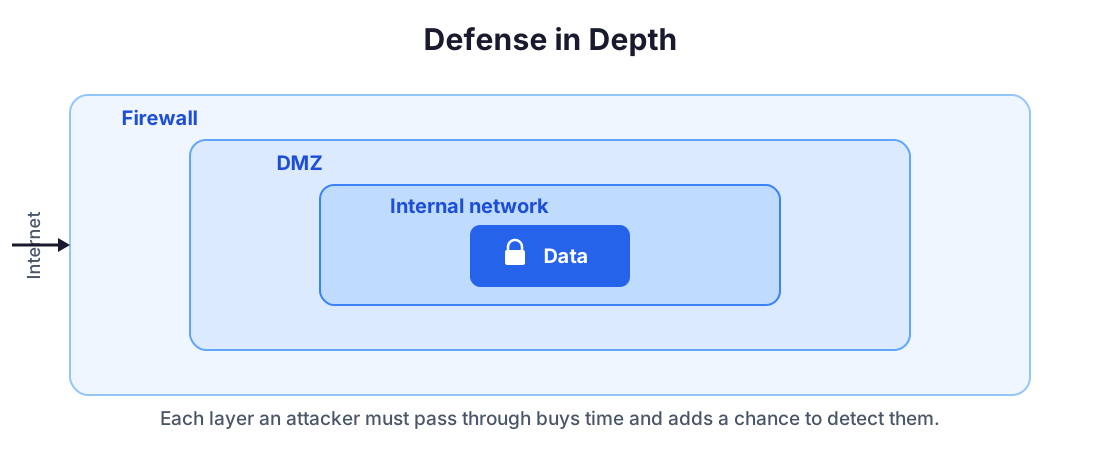
No single security measure is sufficient. Layer your defenses so that if one fails, others remain. A firewall blocks most malicious traffic. An IPS catches what gets through. Endpoint protection handles what reaches the device. Encryption protects data even if everything else fails. Each layer reduces the attacker’s chances of success.
Patch Management
Software vulnerabilities are discovered constantly. Vendors release patches to fix them. Applying these patches promptly is one of the most effective security measures available — yet many organizations lag weeks or months behind. The Equifax breach that exposed 147 million people’s data? Caused by a vulnerability that had a patch available for two months before the attack.
Employee Training
Humans remain the most exploited vulnerability. Regular security awareness training — teaching employees to recognize phishing, use strong passwords, report suspicious activity — dramatically reduces successful attacks. The most sophisticated network security is worthless if an employee clicks a malicious link and enters their credentials.
Security Policies
Written policies define acceptable use, access management, incident response, data classification, and more. They create clear expectations and accountability. Without policies, security is ad hoc and inconsistent.
The Future of Network Security
Network security is evolving rapidly in response to changing threats and technology.
AI-powered security uses machine learning and artificial intelligence to detect threats in real time, predict attacks before they happen, and automate responses. AI can analyze millions of events per second, far exceeding human capacity.
Software-defined networking (SDN) separates the network’s control plane from the data plane, enabling active, programmable security policies that adapt to conditions automatically.
Quantum computing threatens to break current encryption algorithms. Post-quantum cryptography — new encryption methods resistant to quantum attacks — is being developed and standardized now, before quantum computers become powerful enough to pose a threat.
IoT security is becoming critical as billions of connected devices — many with minimal built-in security — join networks. Smart thermostats, industrial sensors, medical devices, and connected vehicles all expand the attack surface.
Key Takeaways
Network security protects the infrastructure that connects our digital world. It combines firewalls, encryption, access controls, monitoring, and human practices to defend against an shifting threat field. No single tool or technique is sufficient — effective security requires layered defenses, continuous monitoring, and regular updates.
The shift to zero trust architectures, cloud computing, and AI-powered security tools represents a fundamental rethinking of how we protect networks. The perimeter-based “castle and moat” model is giving way to granular, identity-based security that assumes threats exist everywhere.
Whether you’re managing a home Wi-Fi network or a global enterprise infrastructure, the principles remain the same: know your assets, understand your threats, layer your defenses, and never assume you’re safe.
Frequently Asked Questions
What is the difference between network security and cybersecurity?
Network security is a subset of cybersecurity focused specifically on protecting network infrastructure and data in transit. Cybersecurity is broader, covering application security, endpoint security, cloud security, and even physical security of devices.
Do small businesses need network security?
Absolutely. Small businesses are frequent targets because attackers know they often lack dedicated security staff. In 2024, 43% of cyberattacks targeted small businesses. Basic protections like firewalls, encryption, and employee training are essential regardless of company size.
Can a firewall alone protect my network?
No. A firewall is one layer of defense, but modern threats require multiple overlapping protections — intrusion detection, encryption, access controls, regular patching, and user education. This layered approach is called defense in depth.
How often should network security be updated?
Continuously. Security patches should be applied as soon as they're released, firewall rules reviewed monthly, penetration testing done at least annually, and security policies updated whenever the network architecture changes or new threats emerge.
What is a zero-trust network?
Zero trust is a security model where no user or device is automatically trusted, even if they're inside the corporate network. Every access request must be verified, authenticated, and authorized. The principle is 'never trust, always verify.'
Further Reading
Cite this article
APA
WhatIs.site. (2026). What Is Network Security?. Retrieved May 27, 2026, from https://whatis.site/network-security MLA
"What Is Network Security?." WhatIs.site, March 6, 2026, https://whatis.site/network-security. Accessed May 27, 2026. Chicago
WhatIs.site. "What Is Network Security?." Last modified May 12, 2026. https://whatis.site/network-security. HTML
<a href="https://whatis.site/network-security">What Is Network Security?</a> — WhatIs.site Related Articles
What Is Cryptography?
Cryptography protects information through mathematical techniques that ensure privacy, integrity, and authenticity. Learn how encryption actually works.
technologyWhat Is Blockchain?
Blockchain is a distributed digital ledger that records transactions across many computers in a way that makes it nearly impossible to alter past records.
technologyWhat Is Machine Learning? How Computers Learn Without Being Programmed
Machine learning enables computers to learn patterns from data and make decisions without explicit programming. Explore how it works and why it matters.
technologyWhat Is an Algorithm?
Algorithms are step-by-step instructions for solving problems. Learn how they work, why they matter, and how they shape everything from search engines to AI.
technologyWhat Is Cloud Computing?
Cloud computing delivers computing resources over the internet on demand. Learn about IaaS, PaaS, SaaS, major providers, and how the cloud actually works.